If you frequently leave your desk with a stiff neck, aching shoulders, or a tension headache, your chair might not be the problem. The human body is hardwired to follow the eyes. If your screen is positioned too low, your head will naturally drift forward and downward to read the text. If it is too high, you will unknowingly tilt your chin up, creating severe compression at the base of your skull.
Most people simply place their monitors on the desk using the factory-provided stand and accept whatever height it happens to be. This passive approach to workspace geometry is a primary driver of chronic upper body pain for desk workers.
This tutorial breaks down the exact physical geometry required for a pain-free workspace. We will explore the mechanics of monitor height alignment and teach you exactly where your screen should sit to keep your cervical spine in a healthy, neutral position.
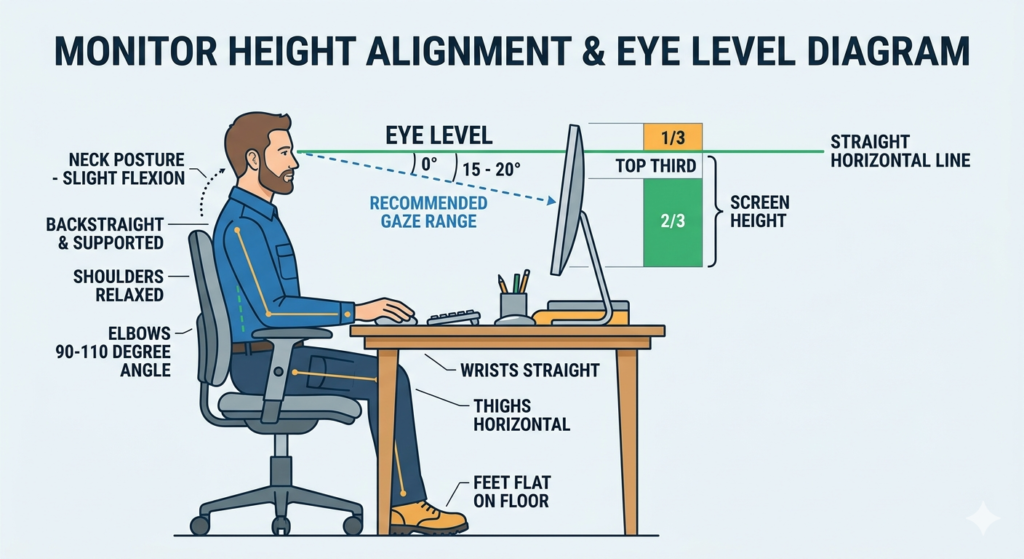
Understanding Proper Placement
What is proper monitor height alignment? Proper monitor height alignment is the ergonomic positioning of a digital display so the top third of the screen sits at or slightly below your horizontal eye level. This geometry prevents forward leaning, maintaining a naturally balanced and neutral cervical spine.
The human head weighs approximately 10 to 12 pounds. When your head is perfectly balanced over your shoulders, your neck muscles do very little work. However, for every inch your head tilts forward to look at a low screen, the gravitational load on your neck muscles effectively doubles. Over an eight-hour shift, this leads to deep muscular exhaustion.
The Science of the Gaze Angle
Achieving perfect alignment is not just about keeping the neck straight; it is about respecting how your eyes naturally function. When your head is perfectly level and your facial muscles are relaxed, your eyes do not look perfectly straight ahead.
The resting line of sight for a human naturally falls about 15 degrees below the true horizontal. This downward gaze angle means that you can comfortably view the center of your screen without needing to tilt your head downward.
If you place your monitor too high—where the center of the screen is directly at your eye level—you will be forced to look upward. Looking upward for prolonged periods causes neck extension (tilting the head backward), which pinches the suboccipital nerves at the base of the skull and rapidly induces fatigue.
Step-by-Step Monitor Calibration
To stop your neck from hurting, you must calibrate your screen to your specific seated dimensions.
- Set Your Posture First: Do not adjust the monitor yet. Adjust your chair so your feet are flat on the floor, your lower back is supported, and your shoulders are relaxed.
- Find True Horizontal: Look straight ahead at the wall behind your desk. Point to the exact spot on the wall that is horizontally level with your eyes.
- Adjust the Screen: Move your monitor so that the top bezel (the physical plastic frame at the top) aligns with that horizontal point.
- Tilt the Display: Tilt the bottom of the monitor slightly toward you (about 10 to 20 degrees). Because your gaze angle is directed downward, tilting the screen ensures that your eyes strike the glass at a perfectly perpendicular angle, which also aids in glare reduction as discussed in our related guide, Computer Vision Syndrome: Preventing Digital Eye Strain.
Upgrading for Unlimited Adjustability
The most significant barrier to achieving this perfect geometry is the hardware itself. Many budget or standard monitors come with static stands that offer zero vertical adjustability.
If your monitor is too low, you can temporarily elevate it using a stack of sturdy books or a wooden block. However, if your monitor lacks built-in height adjustment and you want a clean, professional setup, mounting the screen to an adjustable pneumatic arm is the best solution. If your monitor does not have the standard four mounting holes on the back, you can attach a specialized bracket to the frame to make it compatible with modern mounting arms, allowing for infinite micro-adjustments.
Special Considerations: Bifocals and Progressives
The standard rules of monitor alignment change drastically if you wear corrective lenses with multiple prescriptions, such as bifocals or progressive lenses.
Because the reading portion of these lenses is located at the very bottom of the frame, wearers are forced to tilt their heads backward (severe neck extension) to read text on a monitor placed at standard eye level.
If you wear bifocals, you must lower your monitor significantly—often so the screen is resting just a few inches above the desk surface. Then, tilt the screen upward at a sharp angle, almost like a drafting table. This specific geometry allows you to read through the bottom of your lenses while keeping your neck completely straight and relaxed.
Conclusion
Your physical posture is entirely dictated by where you rest your eyes. By understanding the critical geometry of monitor height alignment, you can eliminate the root cause of daily neck pain. Set the top of your screen to your true horizontal eye level, respect your natural downward gaze angle, and ensure your hardware allows for the precise adjustments your body requires. Modifying this single element of your workspace will yield immediate dividends for your cervical spine health.
Frequently Asked Questions (FAQ)
Should a computer monitor be tilted up or down?
A monitor should generally be tilted slightly backward (the top tilting away from you and the bottom tilting toward you) at roughly a 10 to 20-degree angle. This accommodates your natural downward gaze and ensures you are looking directly at the pixels rather than at an angle.
How do I achieve correct monitor height if using a laptop?
Laptops are inherently un-ergonomic because the keyboard and screen are attached. To achieve proper monitor height, you must place the laptop on a riser to elevate the screen to eye level, and then plug in a separate, external keyboard and mouse to use on the desk surface.
Is a monitor too high if I have to look up?
Yes. If you have to tilt your chin up or lift your eyes above the horizontal plane to view the top of your screen, the monitor is too high. This will quickly lead to neck extension and chronic upper back tension.
Does a larger monitor need to be placed further back?
Yes. If you upgrade to a very large monitor (32 inches or larger), you must push it further back on your desk. If it is too close, you will be forced to physically rotate your neck side-to-side to see the edges of the screen, negating the benefits of proper height alignment.