In today’s modern workspace, staring at a glowing rectangle for eight to ten hours a day is simply the baseline requirement for most jobs. While we often focus on the physical toll this takes on our backs and necks, we frequently ignore the severe, accumulating stress placed directly on our eyes. If you regularly finish your workday with a dull headache, heavy eyelids, or the feeling that there is sand in your eyes, you are likely experiencing a modern epidemic.
Human vision is well adapted for shifting focus between distances and scanning complex environments. Long periods of fixed, near-distance focus—like working at a screen—place unusual demands on this system.
This pillar guide explores the physiological reality of screen-induced ocular stress. We will break down exactly how digital environments overload our vision, explain the common symptoms you might be ignoring, and provide actionable strategies for protecting your eyesight in a digital world.

Understanding Computer Vision Syndrome
Computer Vision Syndrome (CVS), also known as Digital Eye Strain, refers to a group of vision and eye-related problems that result from prolonged use of digital devices such as computers, tablets, and smartphones. Extended screen time places continuous visual demands on the eyes and can lead to symptoms such as dry eyes, blurred vision, headaches, and difficulty focusing.
When reading printed text on paper, the letters typically have well-defined edges and strong contrast against the background. This stable visual presentation allows the eyes to maintain focus with relatively little effort.
Digital screens present text differently. Characters on a display are formed by grids of tiny pixels whose brightness and color combine to create letters and shapes. Although modern screens use techniques like anti-aliasing to make text appear smooth, the visual structure of pixels and emitted light creates a viewing experience that differs from reading ink on paper.
As a result, the eyes often work harder during extended screen use. Maintaining focus at a fixed near distance for long periods, combined with reduced blinking while concentrating on a screen, can strain the visual system. Over time, this sustained effort may contribute to the symptoms commonly associated with computer vision syndrome.
The Mechanics of Focusing Fatigue
Focusing fatigue occurs because the eyes maintain a constant near-focus for long periods. The ciliary muscles that control the lens remain engaged during prolonged screen use. When you lock your focus on a screen at a fixed distance for hours, these muscles essentially become cramped. This is why, after a long work session, you might look out a window and realize your distance vision is temporarily fuzzy. The ciliary muscles are struggling to relax and flatten the lens after being contracted for so long.
This continuous muscular tension is also a primary trigger for the tension headaches that tend to wrap around the forehead and temples by mid-afternoon.
The Reality of Dry Eyes and Blurred Vision
Beyond muscular fatigue, the physical surface of your eye also suffers during screen time. A healthy human blinks roughly 15 to 20 times per minute. Blinking is crucial; it sweeps a fresh layer of tear film across the cornea, keeping the eye lubricated and washing away microscopic debris.
Studies show that when we look at digital screens, our blink rate drops by a staggering 66%. We instinctively enter a “stare” state to process the digital information.
This dramatic reduction in blinking exposes the tear film to the air, causing it to evaporate rapidly. The result is severe dry eyes, a gritty sensation, and redness. Furthermore, because a smooth tear film is required for proper light refraction, dry spots on the cornea scatter the incoming light, directly causing the blurred vision that many desk workers experience late in the day.
Modifying Your Visual Environment
Preventing digital eye strain requires modifying both your hardware and your physical environment. You cannot change the pixelated nature of the screen, but you can alter how that light interacts with your eyes.
- Adjusting Contrast and Brightness: Your monitor should blend into your room. If your screen looks like a lightbulb in a dark room, it is too bright. If it looks dull and grey, it is too dark. Adjust the brightness so it matches the ambient light in your workspace.
- Managing Artificial Light: Harsh overhead lighting and the blue light frequencies emitted by LED displays can cause glare and retinal stress over long hours. Utilizing blue light blocking glasses can help filter out these harsh frequencies, softening the light that reaches your eyes and creating a more comfortable viewing experience.
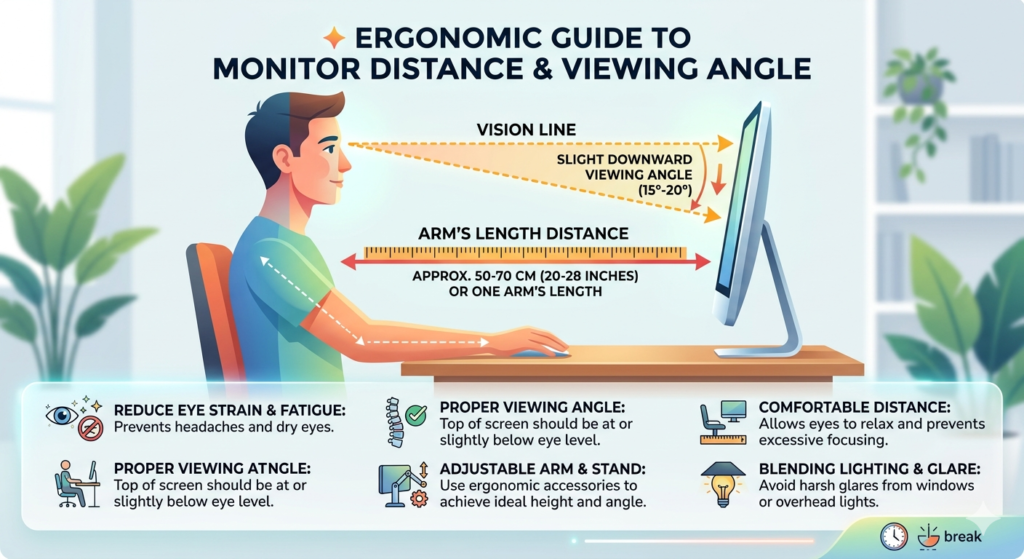
- Monitor Placement: As discussed in our physical posture guides, ensure your monitor is positioned roughly an arm’s length away. Furthermore, position the screen so you are looking slightly downward. Looking down allows your upper eyelid to cover more of the eye’s surface, slowing the evaporation of tears.
Conclusion
Computer vision syndrome is not an inevitable consequence of modern work; it is a physical reaction to an unmanaged environment. By understanding the mechanical reality of focusing fatigue and the reasons behind dry, blurry eyes, you can take active steps to protect your vision. Adjusting your screen brightness, wearing protective lenses, and consciously managing your blink rate will significantly reduce the daily toll on your ocular muscles. Prioritizing your visual health today ensures you maintain sharp, comfortable vision for years to come.
Frequently Asked Questions (FAQ)
Are the effects of computer vision syndrome permanent?
In most cases, the symptoms of computer vision syndrome are temporary and will subside once you step away from the screen and rest your eyes. However, experiencing this strain daily can lead to chronic discomfort and exacerbate underlying vision issues.
Why does my vision get blurry after staring at a screen all day?
Blurry vision is caused by a combination of a drying cornea (due to a severely reduced blink rate) and focusing fatigue (spasms in the tiny ciliary muscles inside the eye that control the lens).
Do I need a special monitor to prevent eye strain?
While you do not strictly need a special monitor, upgrading to a flicker-free monitor with a high refresh rate and a matte, anti-glare finish can significantly reduce the visual “noise” that causes ocular fatigue.
Can digital eye strain cause headaches?
Yes. The continuous contraction of the eye’s focusing muscles, combined with the strain of squinting to read small or low-contrast text, frequently triggers tension headaches that radiate from behind the eyes to the forehead.