Creating a productive workspace goes beyond buying expensive equipment or following the latest design trends. While aesthetic desk setup ideas often dominate social media, the foundation of a sustainable home office lies in the physics of your body—specifically, how it interacts with your environment.
If you have ever finished a workday with a stiff neck, aching lower back, or wrist fatigue, the issue is likely not your workload, but your geometry. A desk that is two inches too high or a monitor sitting too low can force your body into micro-postures that accumulate strain over time.
This guide serves as your comprehensive blueprint for workspace optimization. We will strip away the marketing fluff and focus on the precise measurements, angles, and “Golden Rules” of ergonomics necessary to build a setup that supports your long-term health.
Understanding Ergonomics and Anthropometry
Before moving furniture, it is crucial to understand why standard office furniture often causes pain. Most desks are manufactured to a standard height of 29 to 30 inches. This size is designed to fit a 6’2″ male, yet it is sold as a “one-size-fits-all” solution. This discrepancy falls under the study of anthropometry—the scientific measurement of the human body.
An ergonomic desk setup is a workspace customized to the specific anthropometric measurements of the user, ensuring that equipment creates a neutral interface with the body rather than forcing the body to adapt to the furniture.
When your setup ignores your specific body metrics, you compensate by shrugging shoulders (if the desk is too high) or leaning forward (if the monitor is too far), leading to repetitive strain injuries.
The Foundation: Desk Dimensions and Height
The most critical error in most home offices is the desk height. If your desk surface is too high, you are forced to raise your chair to reach the keyboard, which often leaves your feet dangling off the floor—a recipe for circulation issues and lower back pain.
How to Measure Your Ideal Desk Height
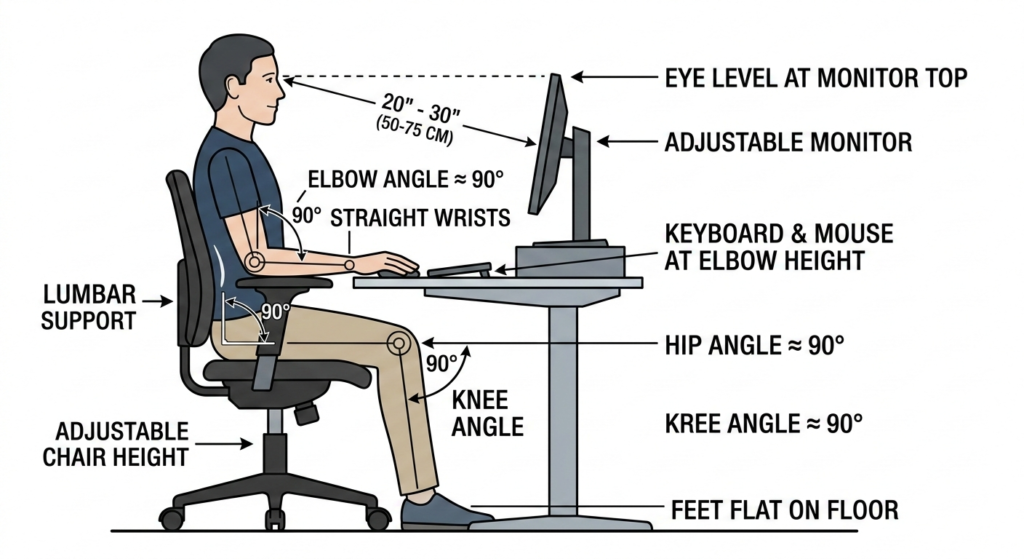
To find your true ergonomic height, you need to measure yourself in a seated position. Sit in your chair with your feet flat on the floor and your shoulders relaxed. Bend your elbows to a 90-degree angle, parallel to the floor.
The distance from the floor to the bottom of your elbow is your ideal desk height. For many people, this is between 24 and 28 inches—significantly lower than the industry standard.
To get this measurement accurate, use a reliable tool. Precision matters here, as even a half-inch difference can impact your shoulder tension.
Workflow Layout: The Reach Zones
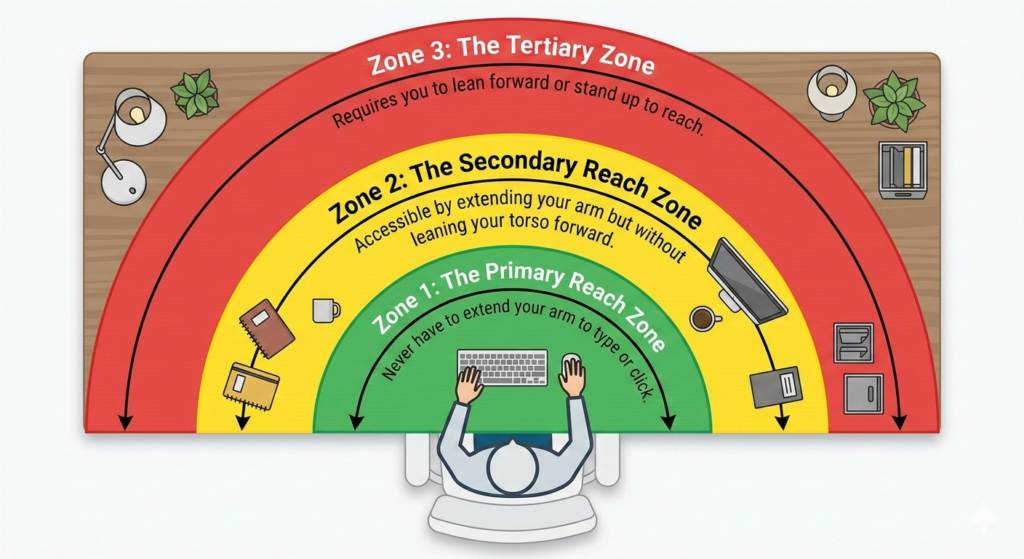
Once your height is dialed in, you must consider the horizontal organization of your desk. This is known as workflow layout. Ergonomists divide the desk surface into three distinct zones to minimize overreaching and twisting.
Zone 1: The Primary Reach Zone
This is the area within the immediate sweep of your forearms while your elbows remain at your sides.
- Items: Keyboard and mouse.
- Rule: You should never have to extend your arm to type or click.
Zone 2: The Secondary Reach Zone
This area is accessible by extending your arm but without leaning your torso forward.
- Items: Notebooks, coffee mug, phone, or frequently referenced documents.
- Rule: Keep items here that you use occasionally throughout the day.
Zone 3: The Tertiary Zone
This is the area that requires you to lean forward or stand up to reach.
- Items: Lamps, plants, decorative items, or storage bins.
- Rule: Never place your mouse or phone in this zone, as repeated leaning creates torque on the lower spine.
Monitor Placement Rules
Visual strain often leads to “text neck” or forward head posture. Your desk setup ideas must prioritize the position of your screen relative to your eyes.
- Distance: The monitor should be roughly an arm’s length away (about 20–30 inches). If you can high-five your screen while sitting back, it is too close. If you cannot touch it with your fingertips, it might be too far.
- Height: The top bezel of the monitor should be at or slightly below eye level. This encourages a slight downward gaze, which is more natural for the eyes and reduces the tendency to tilt the head back.
- Angle: Tilt the screen backward 10 to 20 degrees to reduce glare and accommodate your line of sight.
Conclusion
Building the ultimate setup is not about buying the most expensive gear; it is about respecting the measurements of your body. By applying these rules of anthropometry and strictly adhering to the reach zones, you can transform your station from a source of fatigue into a hub of productivity. Remember, the best desk setup ideas are the ones that you don’t feel at the end of the day because your body remained in a neutral, supported position.
Frequently Asked Questions (FAQ)
What is the standard height for an office desk?
Most standard office desks are manufactured to be 29 to 30 inches high. However, this is often too high for the average person to use ergonomically without a footrest or an adjustable keyboard tray.
How do I know if my desk is ergonomic?
Your desk is ergonomic if you can type with your shoulders relaxed, elbows at a 90-degree angle, and wrists straight, while your feet are flat on the floor. If you have to shrug your shoulders or dangle your feet, the ergonomics need adjustment.
What are the three ergonomic zones?
The three zones are the Primary Zone (items used constantly, like a keyboard), the Secondary Zone (items used occasionally, like a notebook), and the Tertiary Zone (items used rarely, requiring a lean to reach).
Is a curved monitor better for ergonomics?
Curved monitors can be beneficial for ergonomics, especially with wider screens, as they keep the focal distance consistent from the center to the edges of the display, reducing the need for excessive neck turning.